

How Clients Purchase Packages
Your clients can purchase their preferred packages in two ways: at checkout once they have selected a class or via the package widget on your website.
At Checkout
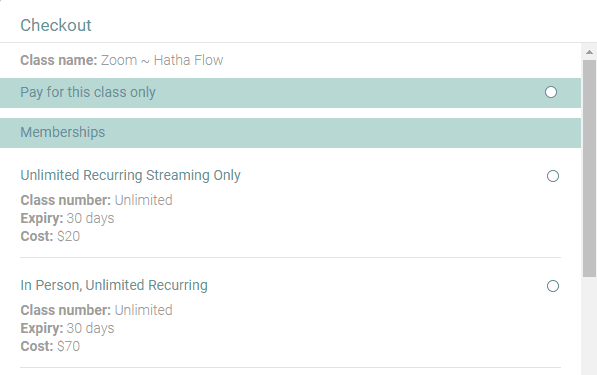
Please see below for an example of what your client will see when they register for a class and arrive at checkout. We will always offer any package options you have available that are appropriate for this class. If any are missing, this is likely because you have not linked the package to the class the client is trying to register for, or they have credits remaining in an existing package and must use those first.
Via the Package tab on the Calendar Widget on Your Website
Once you integrate the ClassFit calendar to your website, there is a Packages. Your clients can purchase your packages directly from here.

In the ClassFit app
It works the same way in the app as on the web. The client goes to your page, selects Packages, chooses Buy on the package and checks out. Or they buy a class and are offered the appropriate packages during checkout. To see the packages they currently have, clients go to My Packages in their account.
If you need any further help with this, please email [email protected].