

Banning and Unbanning Members
Although we hope you will never need to ban a member, we have provided the option, just in case. We’ve outlined how to ban and un-ban users from your classes below.
Removing clients from a class
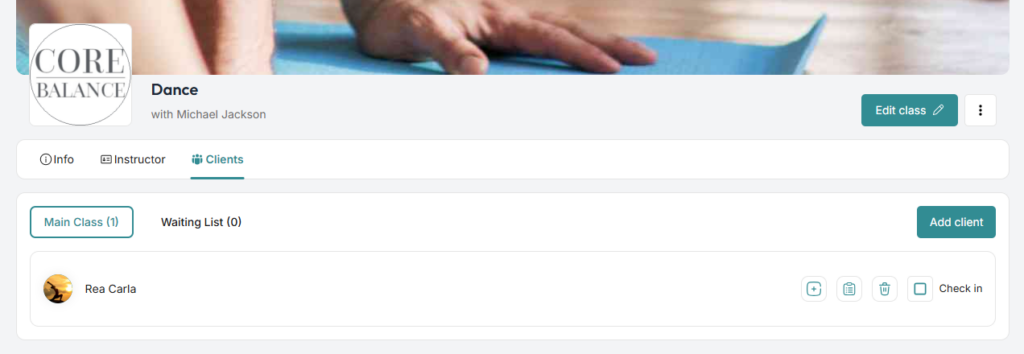
Go to the class details page which the user has joined. Click the tab for Clients then click the trash icon next to their name.
Banning clients
Go to the cient’s profile page by clicking on Clients on the left side menu. Find the user in the participants list and click the block icon next to the pen icon used to edit.

A popup will appear. Are you sure you want to block Rea Carla? Proceed to click Block Client.
Unbanning clients
Go to the left side menu and look for Settings. On the Settings page, go to the Account Settings tab. Scroll down to the last option on that page and click View Block List.
Then click Unblock icon on the right side of the client that you wish to un-ban. Confirm to unblock with the pop-up.
What happens when you block a client?
Blocking a client stops them using your studio from that point on. Here is what they will and will not be able to do.
- They cannot book into your classes or join your waitlists.
- They are taken off the waitlist for every upcoming class at your studio, and any invitations you sent them are cancelled.
- They are taken out of the classes they were booked into at your studio. If they paid for an upcoming class, they are refunded and sent an email and a notification to say the class is no longer available.
- Any memberships they hold with your studio are cancelled.
- They cannot find your studio when they search in ClassFit.
- You cannot add a package to them while they are blocked.
Your client is not told that they have been blocked. They will only see that their bookings have gone.
The changes can take a few minutes to appear, so for a short time, a blocked client may still appear booked in. It is worth checking your class lists afterwards to make sure they have been removed.
Unblocking a client
Unblocking lets the client use your studio again, but it does not put anything back. Bookings that were removed, memberships that were cancelled and refunds that were paid all stay as they were. If the client wants to return, they will need to book again, or you can add a new package to them.
If you need any further help with this, please email [email protected].