

Skip to content
  • Home
  • Pricing
  • Features
    • Features
    • Appointments
    • Booking Calendar
    • Business Profile Page
    • Check-In and Waitlists
    • Class Packs and Memberships
    • Client Profiles and History
    • Custom Branded Emails
    • Flexible Refund Policies
    • Instructor Profiles
    • Intake Forms and Waivers
    • Online Payment Processing
    • Online Streaming
    • Reports
    • Set-Up & Installation Services
    • Video On Demand
    • Your Customer’s Experience
    • Features
    • Appointments
    • Booking Calendar
    • Branded Apps
    • Business Profile Page
    • Check-In and Waitlists
    • Class Packs and Memberships
    • Client Profiles and History
    • Custom Branded Emails
    • Flexible Refund Policies
    • Instructor Profiles
    • Intake Forms and Waivers
    • Online Payment Processing
    • Online Streaming
    • Reports
    • Set-Up & Installation Services
    • Video On Demand
    • Your Customer’s Experience
  • Help
    • Book A Demo
    • ClassFit Blog
    • Contact Us
Login
Skip to main content
< All Topics

A Course is a package linked to specific classes. When a client buys it, they are booked onto every linked class at once. Use it for a fixed set of sessions that clients attend together, such as a term or several weeks of lessons.

Create a course

1. Create a class for each day or session (Classes > Create a class). Make each one payable online.

2. Go to Packages > Create package.

3. Under Package type choose Course.
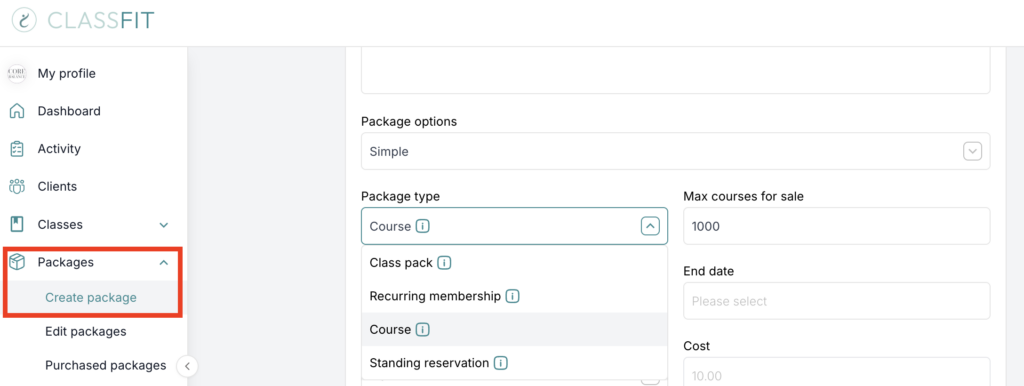
ClassFit create package form with package type dropdown open showing Course option

4. Set the price and an expiry date. Expiry counts from the date of purchase, so if people book far in advance, give it a long expiry.

5. Under “Are all classes, services and video on demand included?” choose Let me choose and tick the classes for this course.

6. Click Create package.

When a client buys the course they are enrolled into all linked classes. If you later create another class and link it to the course, existing buyers are enrolled in that class too.

Course, class pack or two drop-in classes?

Course: one purchase books every linked date. Best for a fixed set of sessions everyone attends.
Class pack: credits that clients can spend on any linked class in their own time. Best for flexible attendance.
Two drop-in classes: two separate bookings and payments. Best when people may attend only one day.

If your course only runs across two days and the same people attend both days, it is usually simpler to create one event that runs for two days. Clients then book it once, and you do not need a course package.

If you need any further help with this, please email [email protected].

Tags:
  • auto-enroll
  • create course
  • how to create a course
  • packages
Previous How to create a Standing Reservation
Next How can I track my account and client activity?

Recent Posts

  • How to Build a Strong Gym Business Plan: 9 Essentials You Need to Succeed
  • Smart and Simple Ways to Manage Gym Memberships
  • Mastering Wellness Center Management: Tools to Grow Your Business with Ease
  • How to Run a Successful Gym: Avoid These 5 Common Mistakes
  • Build a Fitness Brand That Stands Out: Your Guide to Success

Recent Comments

No comments to show.

Archives

  • October 2025
  • September 2025
  • August 2025
  • July 2025
  • June 2025
  • May 2025
  • March 2025
  • February 2025
  • January 2025
  • December 2024
  • October 2024
  • September 2024
  • August 2024
  • July 2024
  • June 2024
  • April 2024
  • March 2024

Categories

  • Blog
  • Uncategorized
ClassFit
Studio Scheduling Software
  • Yoga & Pilates Scheduling Software
  • Fitness Scheduling Software
Terms
  • Terms & Conditions
  • Privacy Policy
  • Cookie Policy
About ClassFit
  • ClassFit Blog
  • Login
ClassFit

Simple scheduling software for studios and teachers. Save time, stay organised and grow your business.

Proud partner of

Yoga Alliance

Product

  • Booking calendar
  • Branded apps
  • Check in and waitlists
  • Online payment
  • Video on demand
Book a Demo ›

For Studios

  • Yoga Studios
  • Pilates Studios
  • Fitness Studios

Company

  • Blog
  • Help Centre
  • Contact Us

Legal

  • Terms & Conditions
  • Privacy Policy
  • Cookie Policy
  • GDPR / Data Protection
Trusted by studios across the world
No setup fees
No long contracts
Friendly support 7 days a week
Download the app
Download on the App Store
Get it on Google Play
© ClassFit 2026. All Rights Reserved.
Manage Consent
To provide the best experiences, we use technologies like cookies to store and/or access device information. Consenting to these technologies will allow us to process data such as browsing behavior or unique IDs on this site. Not consenting or withdrawing consent, may adversely affect certain features and functions.
Functional Always active
The technical storage or access is strictly necessary for the legitimate purpose of enabling the use of a specific service explicitly requested by the subscriber or user, or for the sole purpose of carrying out the transmission of a communication over an electronic communications network.
Preferences
The technical storage or access is necessary for the legitimate purpose of storing preferences that are not requested by the subscriber or user.
Statistics
The technical storage or access that is used exclusively for statistical purposes. The technical storage or access that is used exclusively for anonymous statistical purposes. Without a subpoena, voluntary compliance on the part of your Internet Service Provider, or additional records from a third party, information stored or retrieved for this purpose alone cannot usually be used to identify you.
Marketing
The technical storage or access is required to create user profiles to send advertising, or to track the user on a website or across several websites for similar marketing purposes.
  • Manage options
  • Manage services
  • Manage {vendor_count} vendors
  • Read more about these purposes
View preferences
  • {title}
  • {title}
  • {title}