

How to create a course
A Course is a package linked to specific classes. When a client buys it, they are booked onto every linked class at once. Use it for a two-day workshop, a weekend, or a term.
Create a course
1. Create a class for each day or session (Classes > Create a class). Make each one payable online.
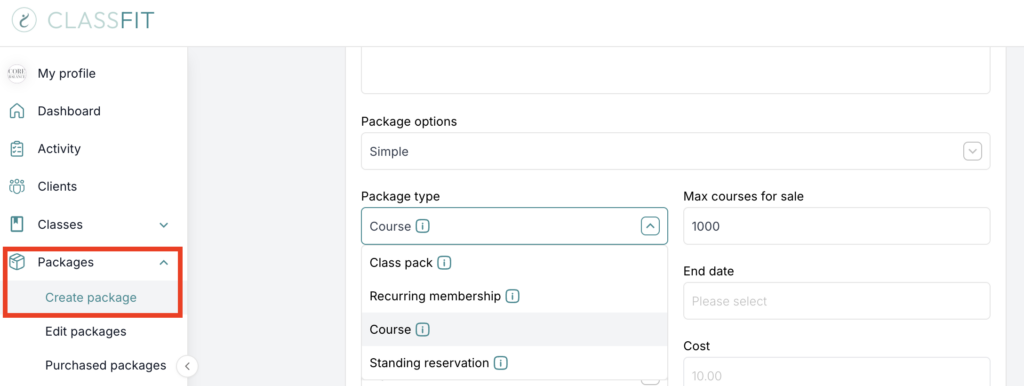
2. Go to Packages > Create package.
3. Under Package type choose Course.
4. Set the price and an expiry date. Expiry counts from the date of purchase, so if people book far in advance, give it a long expiry.
5. Under “Are all classes, services and video on demand included?” choose Let me choose and tick the classes for this course.
6. Click Create package.
When a client buys the course they are enrolled into all linked classes. If you later create another class and link it to the course, existing buyers are enrolled into that too.
Course, class pack or two drop-in classes?
Course: one purchase books every linked date. Best for a fixed set of sessions everyone attends.
Class pack: credits the client spends on any linked class in their own time. Best for flexible attendance.
Two drop-in classes: two separate bookings and payments. Best when people may attend only one day.
If you need any further help with this, please email [email protected].