

How to cancel a recurring membership
Sometimes you will need to cancel a membership. Both the participant and organizer can do this, and we’ll show you how below.
How to cancel a recurring membership from the participant view
If you need to cancel a recurring membership, you can do so from your profile page. First make sure you have the Participant View selected as below.

Once on the profile page, go to My Packages. Then toggle OFF the status for renewal.

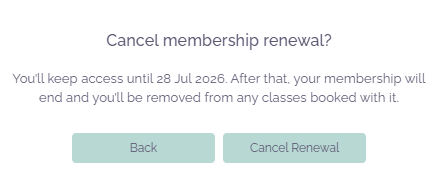
ClassFit will then ask you to confirm that you want to cancel the membership. Click Cancel renewal if you are sure.
How to cancel a recurring membership from the organizer view
Every organizer has a contact database for all clients, including individual contact pages. For more on this please see this article – Adding clients to your database. Then navigate to the individual contact page you require by clicking on their name.
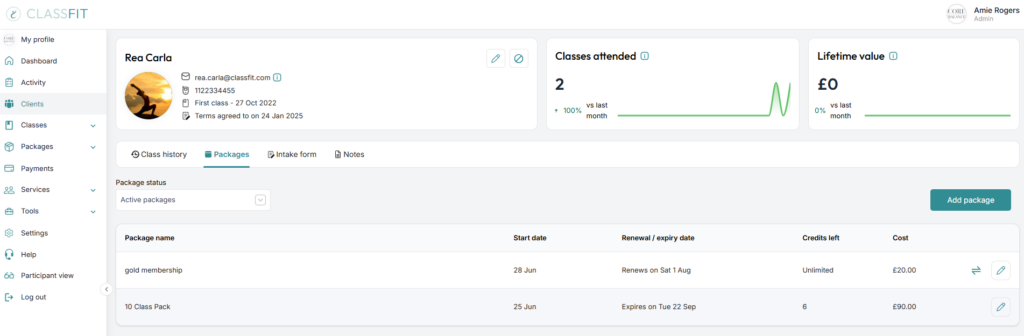
From this page you can go to the Packages tab to edit, pause, or cancel any of your client’s memberships. Simply navigate to the membership you want to cancel, and click on the pencil icon to edit (as pictured below).
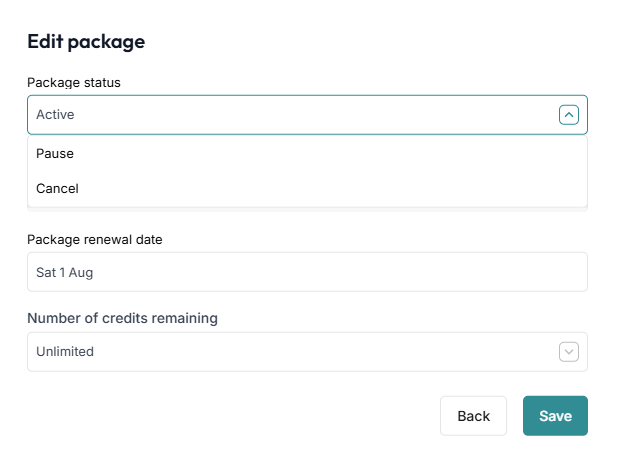
Then change the status from Active to Cancel and click Save.
Once you have completed this, your page will refresh and you should see that the recurring membership is now marked as cancelled.
Cancelling does not refund. Cancelling stops future renewal payments. It does not refund money already taken. To return some or all of a payment, go to Tools > Integrations > Stripe > Access dashboard, find the charge and click Refund, then enter the amount. See How to refund a client.
If you need any further help with this, please email [email protected].